i know some people are super excited about powershell...to be frank, i simply haven't looked at enough to make any judgement.  i've sat through a few very high level overview sessions but not enough to get dirty with it.  well, while waiting to present a session with kirk at CA World this past weekend in vegas, i sat in on david's session about powershell.

immediately upon sitting down i couldn't startup notepad fast enough to start taking notes. even some of the simple things were very cool to see...here's some of the things i learned in the first 5 minutes...

want to do a recursive directory listing grouping by file extensions?

dir -Recurse | group extension

how about searching a directory for only c# files?

dir -Include *.cs -Recurse

okay, what about counting the lines of code within those files?

(dir -Include *.cs -Recurse | select-string .).Count

pretty cool i thought!  then i learned about aliasing features within the shell.  now you can create your own "vi" shortcut:

New-Alias vi notepad2.exe

nice, now typing "vi" will give me my favorite text editor :-)

powershell even supports object creation and manipulation...something as simple as:

$speak = new-object -com "SAPI.SPVOICE"
$speak.Speak("Hello world")

using this object creation you can easily script a lot of things relating to your web development setup, including the creation of sites, config files (manipulating config files), etc.

i learned a lot in those 5 minutes...amazing what you can learn when you get the time to sit down and listen!  enjoy powershell!
this whole twitter craze got me thinking a lot lately.  besides the curious thoughts of the business model behind twitter (not for others, cell phone companies are making money with their plan upgrades, people building twitter apps are making money through ad-funded models, etc.) for themselves, it caused me to think about my use of technology and how other people use it as well.

twitter has become a new instant messenger of sorts i think.  i see much more messages flying across with @username: what are you doing, etc. type comments.  i chuckle when i see messages like that and *that* is what made me realize how technology has been an enabler of avoidance tools.

so how many avoidance tools do you have that you use to avoid personal contact with people?  here are some of mine...

not answering the door/no soliciting signs: well, maybe not technology, but i remember growing up where people left doors open, neighbors sat out on the driveways with each other after work and talked, etc.  now it's open garage-drive in-close garage.  doorbell rings?   if you weren't expecting anyone do you answer?  i barely even bother looking through the peephole anymore -- and now the 'hoods are flooded with no soliciting signs.  minor, but notable.

voice mail and caller id: voice mail has been around for ages.  perhaps the best demonstration of this is in seinfeld's episode where george is avoiding the inevitable break-up with his girlfriend.  he won't answer the phone and uses the voicemail machine to screen calls.  c'mon, who hasn't done that?  now with digital voicemail, it's a bit more processing to screen calls because you may be using a service rather than a machine...so now you have to wait for that tone to tell you that you have to check who you avoided.  caller id? heck do you answer a call anymore from a number you don't know?  and what about instant-reply on voice-mail?  listen to a v-mail, rather than call back you use the "reply with voicemail" feature as long as you are on the same network.

email: do i even need to explain this?  seriously, my wife has to send me email to get things accomplished.  sad i know, but true.  my inbox has become my life to-do list

instant messaging: ah the instant nag.  ping/pong of messages.  don't have time to call/respond to v-mail/email?  use an IM.  it's quick, but we're still avoiding talking to each other.  would an IM conversation happen quicker if you just picked up the phone?

sms: the new mobile instant messenger.  what's funny is that *you are using your phone* to text someone.  wouldn't it make more sense to call?

twitter: now a combination of all of the above...and adding the lovely feature of me now knowing what you are doing on every random moment (heck, i'm guilty of using this now as well)...but i still find it amusing that we are instant messaging the world the fact that we are headed to breakfast.

fascinating, how many tools enable me to avoid talking to you as a person...:-)

heck, even this blog...

if you are a web developer, you most likely want all possible tools available to you.  and there are some great ones out there like firebug, ie development toolbar, etc.  if you are an asp.net developer, you most likely know about the best helper tool by called the ' which is implemented as a browser helper object for internet explorer.

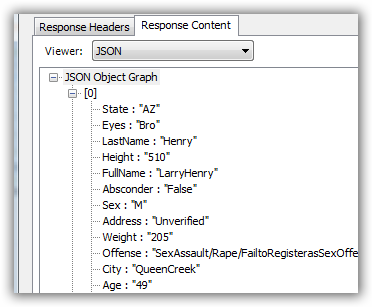
nikhilk has evolved his tool over time and in the latest version has awesome support for reading JSON encoded information and visual representing them in a helper way so that you can see what is going on.  as an example, here is one such view:

well, those that have been running vista may have been running into problems using nikhil's tool if you are either running under UAC-enabled or possibly running internet explorer as an administrator (run as administrator mode).  this may have resulted in the web development helper a) not even showing up under the tools options in IE and/or b) when you enable the toolbar, all you see is a gray area with nothing helpful :-).

well, after reading a bit into one persons attempts, i decided to quickly hack a reg setting to see if it will work (i was one such person that couldn't get it working under vista).  i'm happy to report that my results are favorable and i now have the great web development helper toolbar working under vista with UAC disabled.  yippee...i'm so happy i could cry.

i'm sharing the love so here is my reg hack file.  rename to .reg and merge into your registry.  WARNING: MODIFYING THE REGISTRY COULD CAUSE DAMAGE IF YOU DON'T KNOW WHAT YOU ARE DOING...PERFORM THIS TASK AT YOUR OWN RISK!

man, i'm really impressed with what people are doing to create their own unique experiences.  since i'm mostly in internet explorer (and to be quite honest, it serves me well, i've found no reason (yet) not to keep using it) i've not been privy to some of the utility plugins for firefox.  firefox has an amazing plugin ecosystem that i wish would exist for ie.  the other day i posted about the stylish plugin and a custom interface for google reader.  well today, i've found two other gems with firefox.  the first is a greasemonkey script that adds a new interface for your gmail stuff.  here is a glimpse:

the other is the S3 Organizer plugin -- very slick.

so at tech lunch wednesday here in phoenix, after lunch i sat with hamid and scott for a bit and we were brainstorming about a few things.  one of which was storage, then we got on the topic of amazon's s3 solution.  i had started to look at it before, but then never got the time to go back.  essentially amazon provides storage via a web service (there are no tools provided by them, just an api).  i said that i mainly use flickr for the storage and that i'd only use it if i could get a direct url to things, and that i'd have to have a plugin for live writer :-).

well, when i got back i started to mess around a bit and got a working progress for my "s3 browser" live writer plugin.  you can browse your buckets and link to an item as a link or an image.  it is very rough right now, has some issues with UI threads, etc., but it works for me so far.

you can take a look at the screenshot below -- and the link is directly to my s3 stored image!