i've been participating in some online learning offerings that microsoft has going on with regard to web development.  i've been doing some of the PHP webcasts recently, but there are a bunch of other topics to choose from such as:

  • Expression Web tutorial
  • ASPNET Configuration and health monitoring
  • Interop with PHP and Windows
  • Using the Microsoft AJAX library in PHP
  • Mash-it-up with PHP
  • Discover "Orcas"
  • ASP.NET for STRUTS developers

check those sessions out and register here.

i was just sitting on a plane with simon back from redmond where i was doing some mobility developer "stuff" and simon was at some top secret, could-tell-you-but-i'd-have-to-kill-you type things.  we were chatting about, well, you know geek stuff.  i was droning on about some vista stuff and he was talking about the smart stuff he works on.

it reminded me about their (them being interface, who simon is one of the 'fellows' -- well if he isn't they should institute some plan) ajax training.  he put together some great content on asp.net ajax in a self-paced DVD format and even had it updated for the v1 RTW version.  so it is a complete training offering on DVD for $99 (well $102 including shipping).  take a look if you are in the market for the training...it's nominal cost for some good, self-paced learnings on asp.net ajax and some of the controls.

at what age do people stop saying "can i get that for you bro?" or "how did it go today boss?"  i see this all the time on golf courses when returning from a round and the "cart boy" (i'm okay saying that because i used to be one) greets you with any one of the guy-dude-bro-boss salutations.  man, do i still look that young?  i guess that's a blessing, but i prefer to keep my "dude" references to people i know.

every once in a while i get asked if you can have both c# and visual basic in the same web site project.  my gut response is always to ask "why would you want to" as i always assume it is a new project, etc.  to me, it simply wouldn't make sense from a new project standpoint, code reviews, coding standards, continuity, project maintenance, etc.

however, people still ask.  to-date i never really tried (and that's been my answer).  i was presented with a usable scenario of why you may need (not want, need) to do this, so i finally tried it.  the answer: yes...kinda...sometimes.

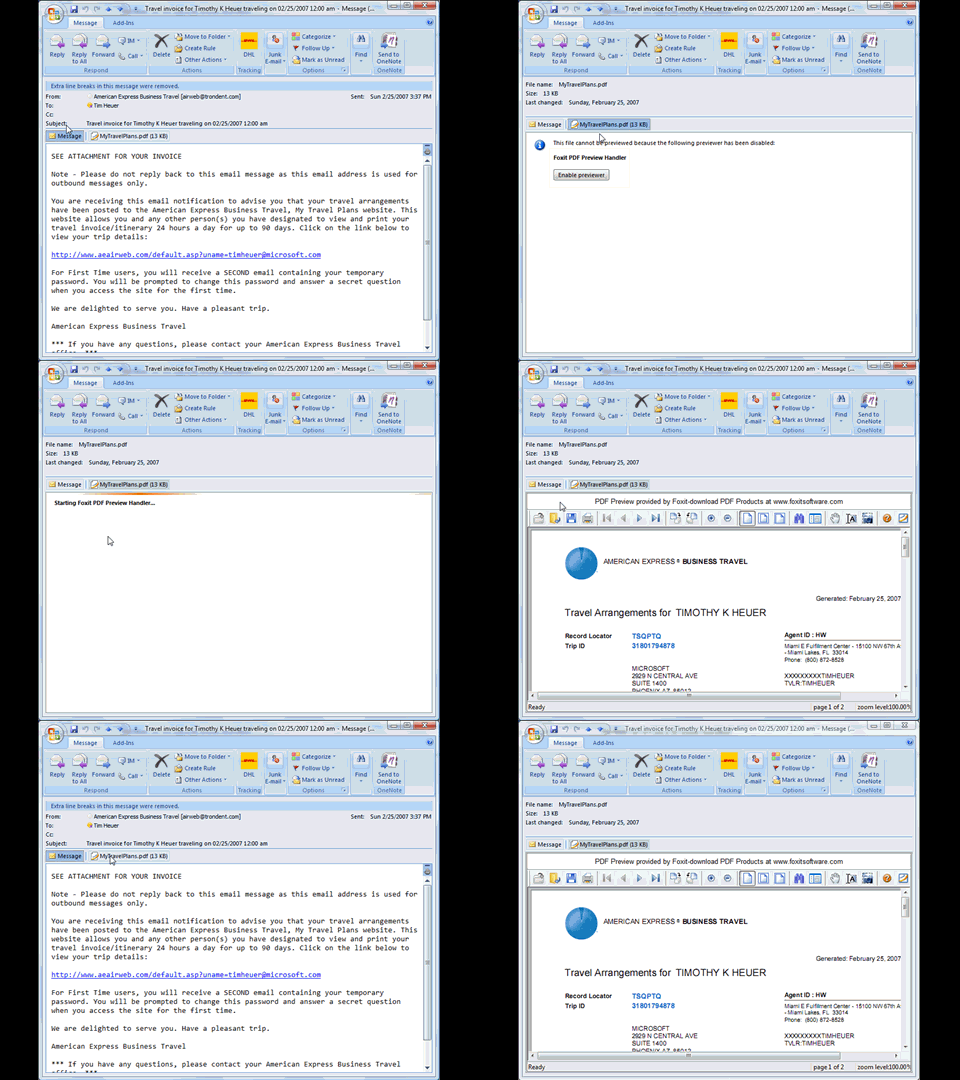
let's assume we have a web site structure like this:

sshot-9

we have the App_Code folder and a .cs and a .vb file in the same projects (separated into sub-folders).  note that the project sees them as folders (yellow folder icon) in the special folder.  each class within there basically has a "hello world" function only, like this in the c# file:

   1:  public string SayHelloCS()
   2:  {
   3:      return "Hello from CS";
   4:  }


and the visual basic file has a similar function emitting "Hello from VB."

now, if you run default.aspx in this structure, this is what you will see:

The files '/WebSite5/App_Code/VBCode/Class2.vb' and '/WebSite5/App_Code/CSCode/Class1.cs' use a different language, which is not allowed since they need to be compiled together.

interesting?  probably not, but it makes sense...so how do we overcome.  we use a configuration option called .  here's what we need to add to our <compilation> node in our web.config:

   1:        <compilation debug="false">
   2:          <codeSubDirectories>
   3:            <add directoryName="VBCode"/>
   4:            <add directoryName="CSCode"/>
   5:          </codeSubDirectories>        
   6:        </compilation>


once we add those codeSubDirectory nodes, let's "look" at what the project structure looks like now:

sshot-10

as you can see the code folders are now "special" in the eyes of visual studio.  now if we browse default.aspx we will see:

Hello world from CS. Hello world from VB

and we're done.  so if you have some legacy code (let's say a provider) that is in visual basic and your new project is c# (and you've already had the long heated debates with your team on why you are choosing a language over the other), you can implement this option of using .

now, you can also have multiple pages that have different code-beside languages and that works in this model.  however, if you are using the web application project model, this will not work.  the multiple code files only works inherently (along with codeSubDirectories) with the web site model.

hope this helps.
Welcome LifeHacker visitors!

[UPDATE: More updated information and alternative download links here: Foxit PDF Previewer.]

UPDATE: If you are experiencing problems with 'white page' PDF previewing, it is likely the PDF has scanned images.  See this post for an update on how to fix: Foxit Previewer Update.

in my daily work i spend a majority of my 'computing' time in outlook.  communicating with peers, team members, customers, etc. is mostly done via communication (sad, i know).  a lot of that time it involves sending information attachments back and forth, using office documents, etc.  i've said a lot about how much i love the preview functionality within vista and office 2007.  i even wrote a code preview handler for .cs, .vb, .sql, .js files.

one of the samples in the msdn article by stephen toub was for pdf files...of which i receive a lot.  i don't use adobe reader because i think it is overkill for reading pdf's personally.  the sample, however, relies on having adobe reader installed...which i didn't like.  i started working with the , because i love their reader product.  after some communication with the team at foxit, we started collaborating.

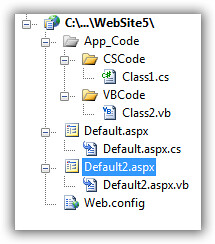
as a result of that collaboration, and i partnered to create the 'foxit pdf preview handler' which you can download for free!  this is a pdf preview handler for outlook 2007 and windows vista.  the current version requires vista, but we are working on a windows xp version for outlook 2007 on winxp.  what this enables you to do is, well...the following:

Foxit PDF Preview Handler

no need for adobe to be installed, etc.  it's fast, it's furious.

there is no official support included for this add-on, but i'm happy to field questions/suggestions myself.  keep in mind, i'm not going to be (nor will they) altering the pdf renderer...that's their product.  if you need pdf rendering capabilities within your application, i highly suggest looking at integrations using their dll and activex sdk's for your applications.  they are a great company with a great team.  it's a global team and they were very responsive throughout our communication.  i really appreciated their willingness to collaborate on something so simple and helpful to the greater community.  please give them a look-over.

why the 'banner' in the pdf render?  well, it's free :-).  that only shows up there as well...won't be in the printed document or anything...i think it is great to give them credit and a simple, small, unobtrusive banner is entirely appropriate.

please download the foxit pdf preview handler and install today!

Alternate Download Links here.

UPDATE (28-MAR-2008): Windows XP only version here.

file: Foxit PDF Preview Handler